Free LLMs.txt Generator
Generate LLMs.txt file for AI crawlers like GPTBot, ClaudeBot, and PerplexityBot. Control which parts of your website AI systems can access.
Generated LLMs.txt
How to use: Save this content as llms.txt in your website's root directory (same level as your robots.txt). The file should be accessible at https://yourdomain.com/llms.txt.
Error
Generate LLMs.txt in Three Simple Steps
Create a properly formatted LLMs.txt file to control AI crawler access to your website. No technical knowledge required.
1 Enter Website Details
Fill in your website URL, specify which paths to allow or block, and select which AI crawlers to target.
2 Generate File
Our tool generates a properly formatted LLMs.txt file following the official specification for AI crawler access control.
3 Copy & Upload
Copy the generated LLMs.txt content and upload it to your website's root directory to control AI crawler access.
Why Use an LLMs.txt File?
LLMs.txt is a standardized file format that tells AI crawlers which parts of your website they can access. It's similar to robots.txt but specifically designed for AI and LLM systems.
Control AI crawler access
Specify exactly which parts of your website AI systems like GPTBot, ClaudeBot, and PerplexityBot can access and index.
Standardized format
Follow the official LLMs.txt specification to ensure compatibility with major AI crawlers and LLM systems.
Protect private content
Block access to admin areas, private pages, API endpoints, and other sensitive content from AI crawlers.
Improve AI visibility
Guide AI systems to your most important content, helping your site appear in AI-generated answers and summaries.
Easy to implement
Simply upload the generated llms.txt file to your website's root directory. No complex configuration needed.
Free and open standard
LLMs.txt is an open standard that's free to use. No licensing fees or restrictions.
Everything You Need to Know About LLMs.txt
What are LLMs?
LLMs (Large Language Models) are AI systems like ChatGPT, Claude, and Gemini that can understand and generate human-like text.
These models are trained on vast amounts of web content to answer questions, write content, and provide information. When users ask questions, LLMs reference content from websites they've crawled and indexed.
Major AI companies operate crawlers like GPTBot (OpenAI), ClaudeBot (Anthropic), and PerplexityBot that scan websites to build knowledge bases for their AI systems.
How LLMs Use the llms.txt File
The llms.txt specification provides a standardized way to tell AI crawlers which parts of your website they can access.
When an AI crawler visits your site, it looks for llms.txt at the root level (same location as robots.txt). The file uses a simple format: regular paths indicate allowed content, while paths prefixed with ! indicate blocked areas.
This helps AI systems focus on your public, valuable content while avoiding private areas, admin panels, or API endpoints that shouldn't be indexed.
What's the Difference Between llms.txt and robots.txt?
robots.txt is designed for traditional search engine crawlers like Googlebot and Bingbot. It controls which pages search engines can crawl and index for search results.
llms.txt is specifically for AI crawlers and LLM systems. While robots.txt can block some AI bots, llms.txt provides more granular control and follows a format optimized for AI systems.
You can use both files together: robots.txt for search engines and llms.txt for AI crawlers. This gives you better control over different types of automated systems accessing your site.
Is llms.txt Going to Be the Future of GEO?
As AI search becomes more prominent, controlling how AI systems access your content is increasingly important. Industry discussions suggest that llms.txt could become a standard way to manage AI crawler access, similar to how robots.txt became standard for search engines.
With major AI companies adopting the format and growing community support, llms.txt is positioned to become an essential tool for website owners who want visibility in AI-generated answers.
Early adoption gives you better control over how your content appears in AI systems, potentially improving your visibility in AI search results and chat responses.
Beyond LLMs.txt: Continuous AI Search Optimization
Creating an llms.txt file is just the first step. To truly maximize your visibility in AI search, you need ongoing optimization and monitoring.
Orchly.ai helps you track how visible your brand is across AI platforms like ChatGPT, Claude, Gemini, and Perplexity. It monitors when and how AI systems reference your content, identifies content gaps, and suggests improvements to increase your AI search visibility.
While llms.txt controls access, Orchly.ai helps you optimize the content that AI systems can see, ensuring your pages are well-structured, comprehensive, and likely to be referenced in AI-generated answers.
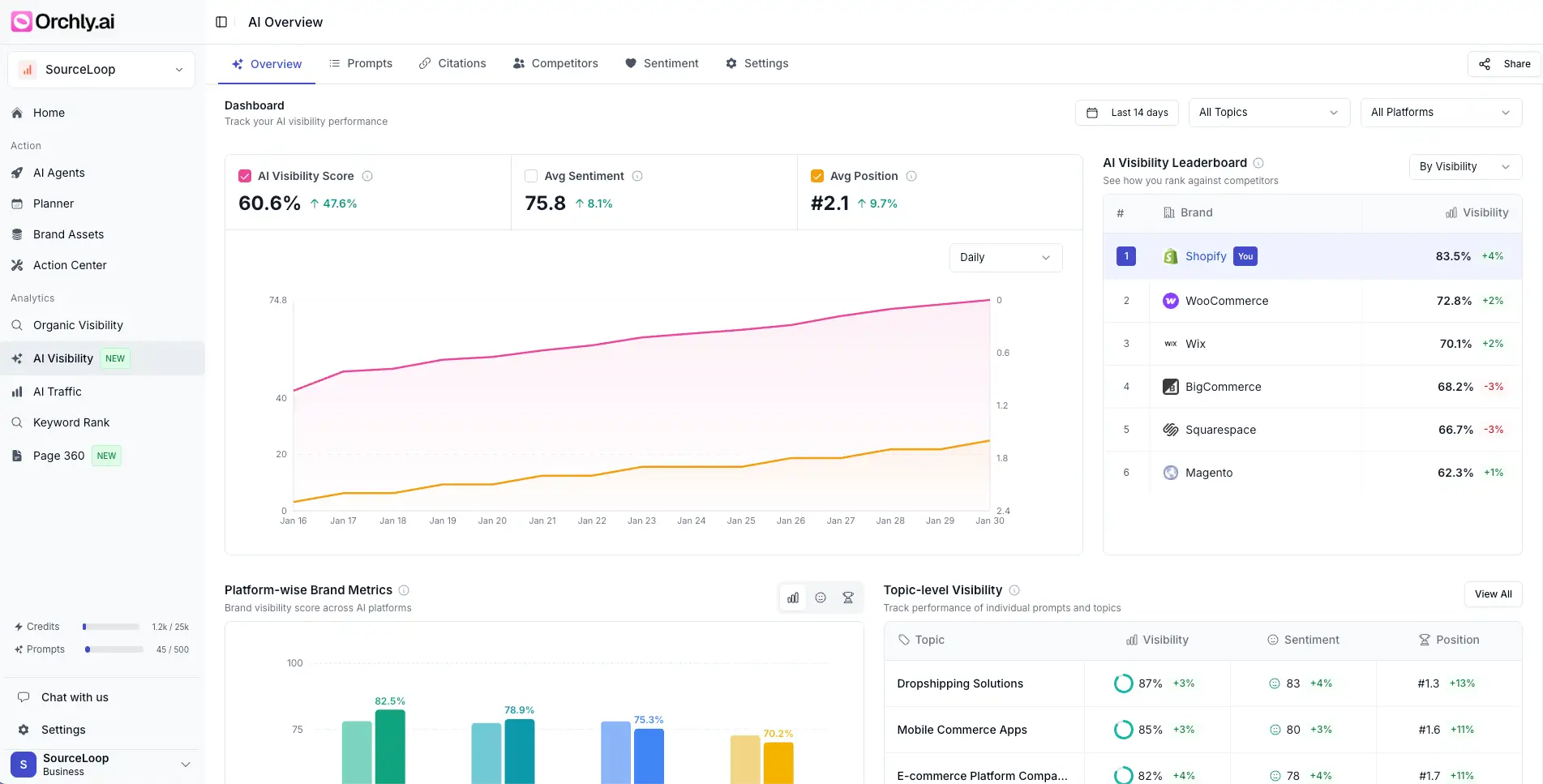
Orchly AI Visibility Tracker
Orchly monitors your brand mentions and visibility across ChatGPT, Claude, Gemini, and Perplexity. You can see exactly when and how AI tools reference your site, and track changes over time.
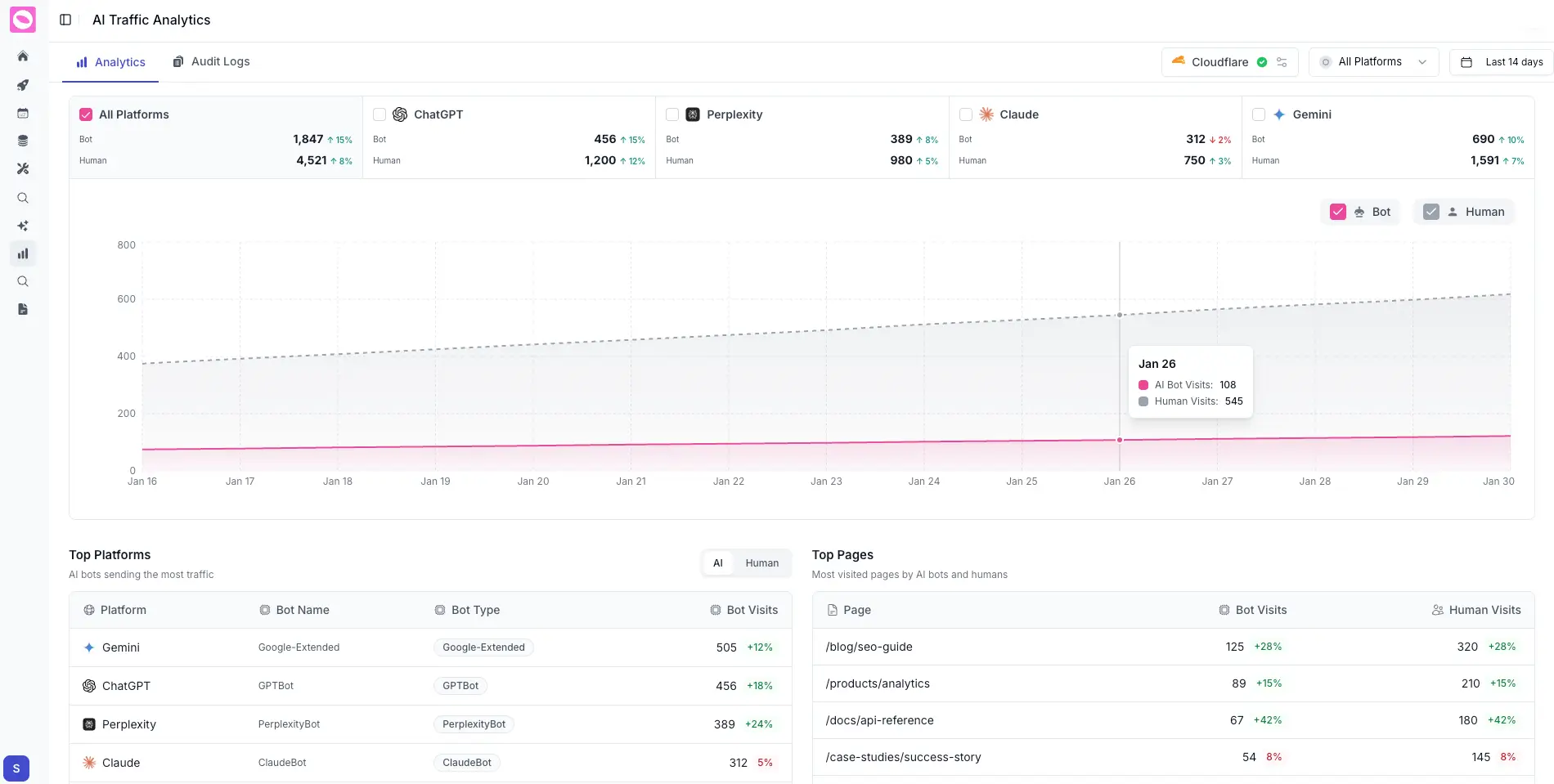
Orchly AI SEO Agents
Beyond tracking, Orchly's AI agents automatically identify content gaps, optimize existing pages, and create new content designed to appear in AI-generated answers across multiple platforms.
Frequently Asked Questions
Everything you need to know about LLMs.txt files.
LLMs.txt is a standardized text file that tells AI crawlers and LLM systems which parts of your website they can access. It's similar to robots.txt but specifically designed for AI systems like GPTBot, ClaudeBot, and PerplexityBot.
The LLMs.txt file should be placed in your website's root directory, the same location as your robots.txt file. It should be accessible at https://yourdomain.com/llms.txt.
robots.txt is designed for traditional search engine crawlers like Googlebot. LLMs.txt is specifically for AI crawlers and LLM systems. You can use both files together - robots.txt for search engines and LLMs.txt for AI systems.
Major AI crawlers that support LLMs.txt include GPTBot (OpenAI), ClaudeBot (Anthropic), PerplexityBot, Google-Extended, CCBot (Common Crawl), and Anthropic-ai. Support is growing as more AI companies adopt the standard.
While robots.txt can block some AI crawlers, LLMs.txt provides more granular control specifically for AI systems. Using both files gives you better control over different types of crawlers - robots.txt for search engines and LLMs.txt for AI systems.
Yes, LLMs.txt is an open standard that's completely free to use. There are no licensing fees or restrictions. This free generator tool helps you create a properly formatted LLMs.txt file without any cost.