












Google Search Console

GSC + GA4 Analytics Tool: Get Actionable Data & Insights

Connect GSC and GA4 to track SEO and website performance, uncover actionable insights, and turn search data into growth opportunities.

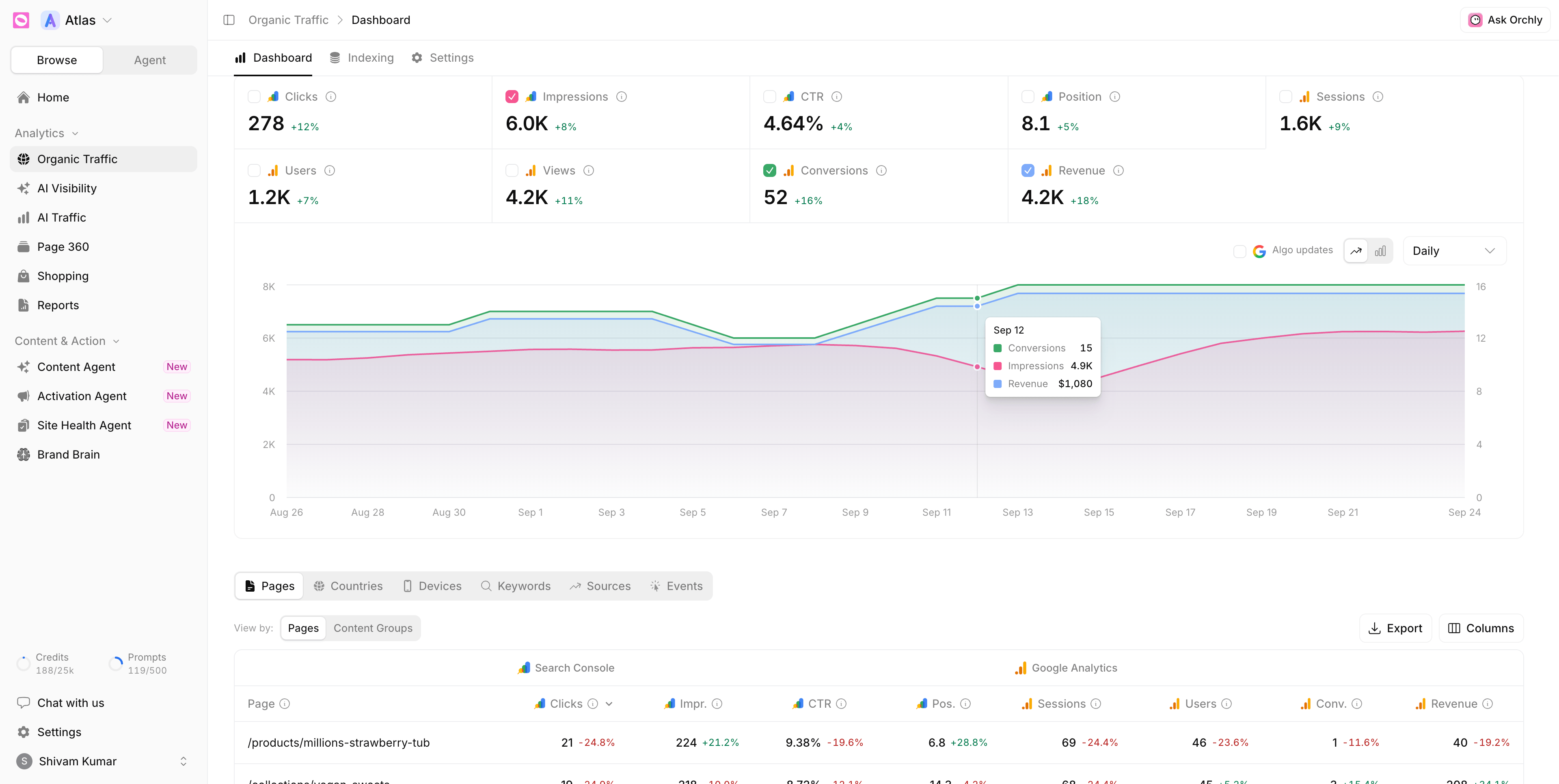
Google Search Console Dashboard
Trusted by 500+ Brands and Agencies across the globe

What you can track

Turn GSC and GA4 data into clear SEO decisions

Combine both sources, track whole topics, catch decaying pages, fix keyword cannibalization and see what Google has indexed, all in one place.

See search and site data in one dashboard impressions and clicks next to sessions and conversions

Organic Visibility Search Console GA4 Last 12 weeks
Organic TrafficKeyword Rank TrackerSettings
Impressions
128K▲ 12%
Clicks
4,820▲ 8%
Sessions
3,640▲ 6%
Conversions
412▲ 9%
Traffic trend Clicks Sessions
W1W3W5W7W9W12
Keywords Pages Countries Channels Sources

Track whole topics, not single keywords with clicks, CTR and position summed per cluster

Organic Visibility Search Console Last 28 days
DashboardIndexingSettings
Topic clusters
12▲ 2
Clicks from clusters
68%▲ 5%
Avg position
8.9▲ 1.3
Performance by topic KeywordsTopic Clusters
Topic cluster Clicks CTR Position Trend
SEO audit42 keywords · seo audit, site audit, audit checklist 3,210 4.8% 6.2 ▲ 18%
Rank tracking28 keywords · rank tracker, serp tracking, keyword rank 2,140 3.9% 8.1 ▲ 9%
Backlinks35 keywords · backlink checker, link building, outreach 1,480 2.6% 11.4 ▼ 7%
Technical SEO19 keywords · core web vitals, crawl budget, schema 960 3.1% 9.7 ▲ 4%
Local SEO12 keywords · google business profile, local pack 410 1.8% 14.2 ▼ 12%

Catch pages losing clicks early and refresh them before the drop compounds

Content Decay Last 6 months
HeatmapPagesLost queries
Decaying pages
8▲ 3
Clicks lost
2,940▼ 38%
Refreshes queued
3▲ 3
Clicks vs baseline, by month −40%+10%
Page JanFebMarAprMayJun Clicks /blog/seo-audit-checklist 0−4%−12%−21%−33%−42%−520 /guides/keyword-research 0+2%−6%−15%−27%−38%−410 /blog/google-core-update 0−10%−18%−24%−31%−36%−360 /blog/backlink-outreach 0−2%−8%−19%−26%−31%−280 /features/rank-tracker 0+3%+1%−5%−9%−14%−120 /blog/local-seo-guide 0+4%+8%+6%+9%+12%+90
3 pages sent to the Article Refresh agent

Find pages competing for the same query and decide which one to keep

Keyword Cannibalization Last 8 weeks
Competing pagesQueriesResolved
Cannibalized queries
14▼ 3
Pages involved
31
Clicks at risk
1,860▲ 12%
Competing pages2 of 14 queries
seo audit checklist2 pages
/blog/seo-audit-checklist #7.2 410 Keep
/guides/site-audit #9.8 250 Merge
rank tracker for agencies3 pages
/features/rank-tracker #11.3 180 Keep
/blog/best-rank-trackers #12.6 146 Merge
/agencies/rank-tracking #18.4 22 Redirect
Ranking URL flips
/blog/seo-audit-checklist /guides/site-audit
W1W3W5W8

7 swaps in 8 weeks for “seo audit checklist”. Merge the guide into the post.

Know which pages Google has indexed and why the rest were left out

Organic Visibility Last inspection
DashboardIndexingSettings
In index
1,284▲ 46
Not indexed
212▼ 18
Not in any sitemap
37
Crawl errors
9▲ 2
Pages Submit URLs for instant indexing
URLStatusLast crawl
/blog/seo-audit-checklist Submitted and indexed 2d ago
/guides/keyword-research Crawled – not indexed 6d ago
/integrations/webflow Discovered – not indexed Never
/features/rank-tracker?ref=nav Duplicate (different canonical) 9d ago
/blog/2021-algorithm-recap Not found (404) 14d ago
Why pages aren’t indexed212 pages
Crawled – not indexed94
Discovered – not indexed61
Duplicate (different canonical)33
Page with redirect15
Not found (404)9

MCP Server

Ask Claude or Cursor about your search performance

Connect once and your GSC and GA4 data works in any AI client. Ask anything, get real numbers, and let agents handle the fixes.

Ask in plain English

Get answers from GSC and GA4 without building a report

Claude Orchly MCP

Which pages lost the most clicks this month?

orchly · get_gsc

/blog/seo-audit-checklist fell 42%, from 1,240 to 720 clicks. It slipped to position 8.4 for “seo audit checklist”.

From insight to action

Hand the fix to an agent right from the chat

Claude Code Orchly MCP

Refresh the three decaying blog posts.

orchly · create_task

Created 3 Article Refresh tasks in Mission Control, starting with /blog/seo-audit-checklist.

One URL to connect

Works in Claude, Cursor, VS Code and Windsurf with OAuth or an API key

orchly — zsh
$ cat .cursor/mcp.json
{ "mcpServers": { "orchly": {
"url": "https://app.orchly.ai/api/mcp" } } }
✓ orchly connected · signed in with OAuth
› Compare organic sessions to last month

How do I connect my Google Search Console account?

Connecting your Google Search Console account is simple. Go to the integrations section in your Orchly dashboard and click "Connect Google Search Console." You'll be redirected to Google to authorize the connection. Once connected, Orchly automatically syncs your search performance data, including impressions, clicks, CTR, and average position for both pages and keywords.

What data does Orchly pull from Google Search Console?

Orchly syncs comprehensive data from your Google Search Console, including page-level metrics (impressions, clicks, CTR, average position) and keyword-level data (search queries, rankings, performance trends). This data is updated regularly to give you the most current insights into your search performance and help identify optimization opportunities.

How often is the data refreshed from Google Search Console?

Orchly syncs your Search Console data daily. Google itself reports with a delay of about two days, so the latest days in any Search Console tool fill in over time.

Can I track multiple properties from Google Search Console?

Yes! Orchly supports tracking multiple Google Search Console properties. You can connect multiple properties and view their performance data side-by-side or separately. This is especially useful for agencies managing multiple clients or businesses with multiple websites or subdomains.

What insights can I get from page-level data?

Page-level insights show you how each individual page on your site performs in Google search. You can see which pages get the most impressions, clicks, and traffic, as well as their average position and CTR. This helps you identify top-performing pages to replicate their success, and pages with high impressions but low clicks that need optimization.

How do keyword-level insights help my SEO strategy?

Keyword-level insights show you exactly which search queries drive traffic to your site. You can see ranking positions, impressions, clicks, and CTR for each keyword. This data helps you understand user intent, identify ranking opportunities, and optimize content to better match what searchers are looking for.

Is my Google Search Console data secure?

Absolutely. All data synced from Google Search Console is encrypted and stored securely. We use OAuth 2.0 for secure authentication and never store your Google credentials. Your data is never shared with third parties and is protected with industry-standard security measures.

Can I export the data for analysis in other tools?

Yes! You can export your Google Search Console data from Orchly in various formats including CSV and JSON. This allows you to analyze the data in Excel, Google Sheets, or other analytics tools. You can also use our API to integrate the data with your existing reporting and analytics workflows.