How to use Mission Control in Orchly
Mission Control is your single dashboard for AI visibility, organic traffic, and rankings. Learn how to read it and where each number comes from.
Mission Control is the command center for your SEO and content work. It’s a board where every job lives as a task, moves through clear stages, and gets done, mostly by agents. The twist is that you don’t have to think up the work yourself: Orchly’s recommendation engine watches your data around the clock and drops suggested tasks straight onto the board, ready for you to approve.
You’ll find it under Content & Action → Mission Control.
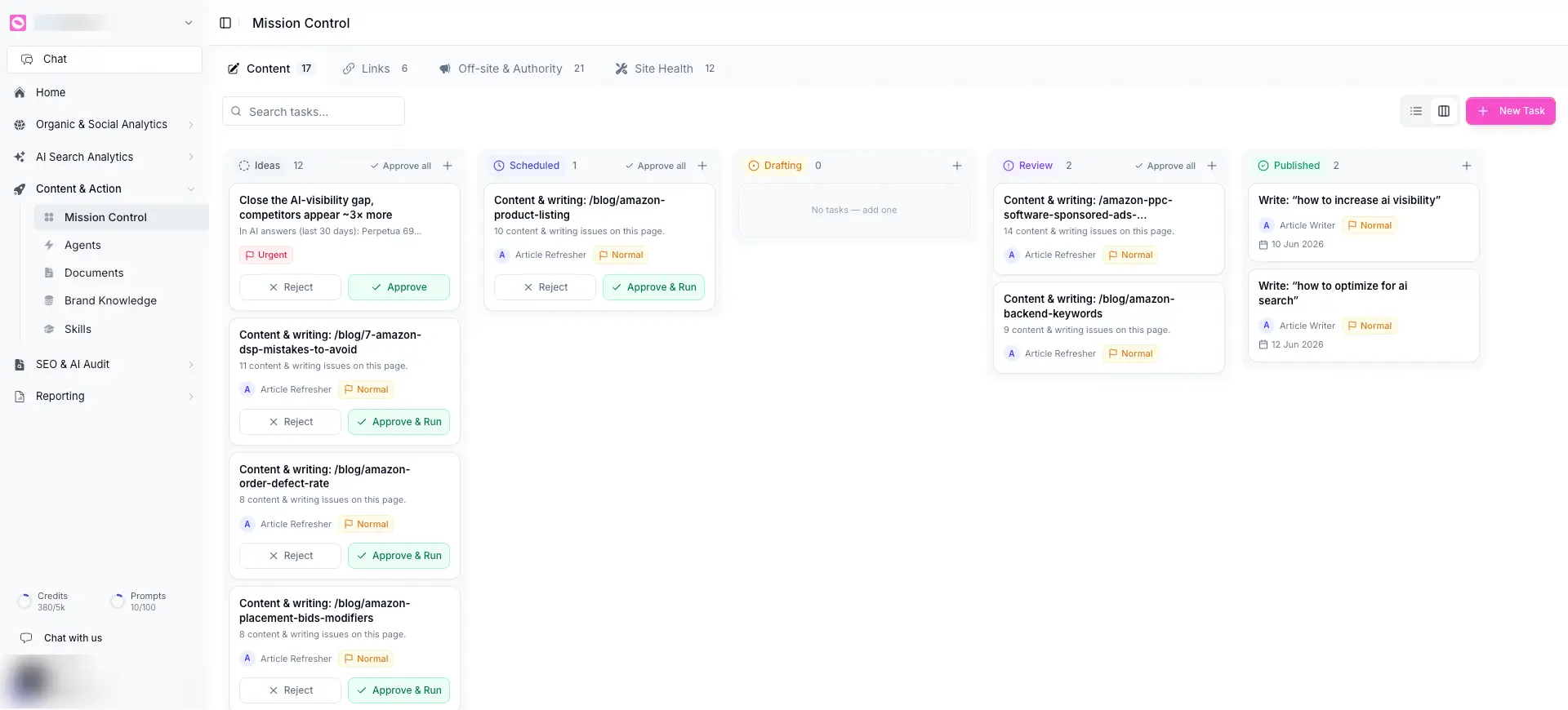
The four boards
Across the top, work is split into four boards, each with a live count of open tasks:
- Content, writing and refreshing pages.
- Links, internal and outbound linking.
- Off-site & Authority, work beyond your own site.
- Site Health, technical and page-quality fixes.
Switch boards by clicking a tab. Each board is its own pipeline, so a content job never gets buried under a technical one.
How a task moves
Within a board, tasks flow left to right through five columns:
- Ideas, suggested or newly created tasks waiting for your go-ahead.
- Scheduled, approved tasks queued to run.
- Drafting, work an agent is actively producing.
- Review, finished work waiting for your approval.
- Published, done and live, with the date it shipped.
Each column has its own count, a + to add a task, and, where it makes sense, an Approve all to clear the column in one move.
Where tasks come from
Tasks land on the board two ways.
The recommendation engine (automatic)
This is what makes Mission Control different from a normal to-do list. Orchly’s recommendation engine constantly scans your visibility, traffic, rankings, and page data, then writes the work it finds into the Ideas column of the right board, with the reason attached.
A real example from the board: “Close the AI-visibility gap, competitors appear ~3x more”, tagged Urgent, with the supporting data right on the card (“In AI answers over the last 30 days…”). You didn’t ask for that task; Orchly noticed the gap and proposed the fix.
For each idea, you simply decide: Approve to accept it, or Reject to dismiss it. Approving sends it down the pipeline.
Skim the Ideas column each morning. It’s Orchly telling you exactly where you’re losing ground and what to do about it, sorted so the urgent items stand out. Approve the ones worth doing, reject the noise, and the board fills itself.
Tasks you add yourself (manual)
You can also create a task directly. Click New Task and fill in the details.
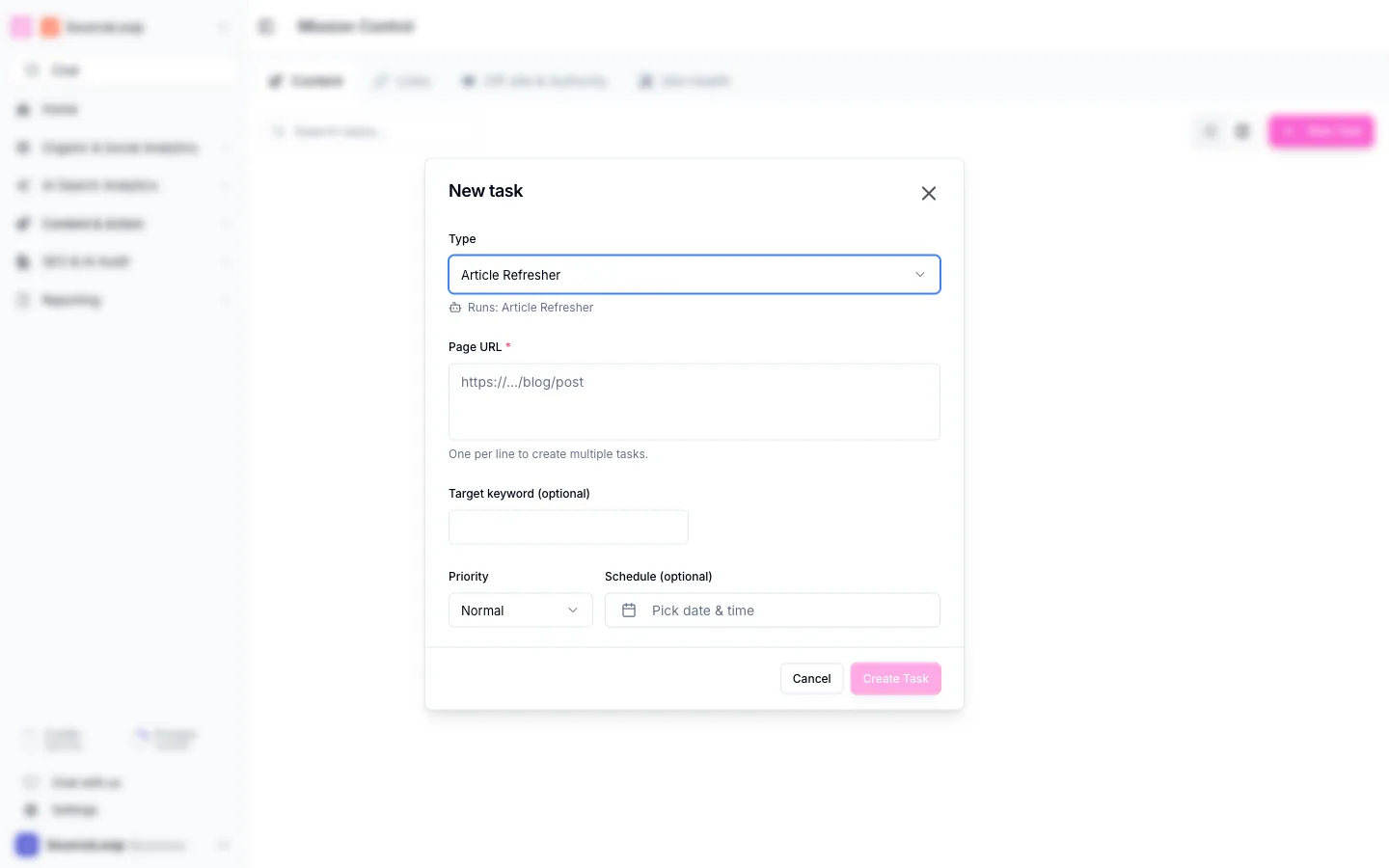
- Type, which decides the agent that runs the task (for example, “Article Refresher”). The dialog shows you which agent will pick it up.
- Page URL, the page to work on. Add one URL per line to create several tasks at once.
- Target keyword (optional), to focus the work.
- Priority, so the important jobs run first.
- Schedule (optional), to run it now or at a set date and time.
Click Create Task and it joins the board.
How tasks run: the agent connection
Every task is tied to an agent, shown right on the card (Article Writer, Article Refresher, and so on). That’s the worker that does the job. Approving a task hands it to its agent:
- Approve & Run sends the task to the agent, which moves it through Drafting and into Review.
- The agent uses your brand profile, abilities, and skills to produce the work.
- Finished output waits in Review so you can approve it before it’s published.
In other words: the recommendation engine decides what to do, the agent does it, and you stay in the loop at approve and review.
What’s still manual for now
Not everything can be automated yet, and Mission Control is honest about that:
- You approve the work. Ideas don’t run until you approve them, and most finished work waits in Review before it’s published. That’s by design while you build trust in the agents.
- Off-site and authority tasks often need a human. Orchly can recommend outreach, a guest post, or a listing and track it on the board, but the off-platform step (the actual email, the actual submission) is still something you do yourself, then mark complete.
- Some fixes are recommendations, not actions. For work Orchly can’t safely perform on its own, the task tells you precisely what to change so you, or a teammate, can do it.