How to monitor your pages for SEO issues
Add the pages that matter and let Orchly watch them for broken links, missing content, and SEO problems.
Your most important pages quietly pick up problems over time: a meta description goes missing, schema breaks, a heading gets dropped in a redesign. The Pages area watches the URLs you choose and scores each one on three fronts, SEO, AEO, and GEO, so you always know which pages need attention.
You’ll find it under SEO & AI Audit → Pages.
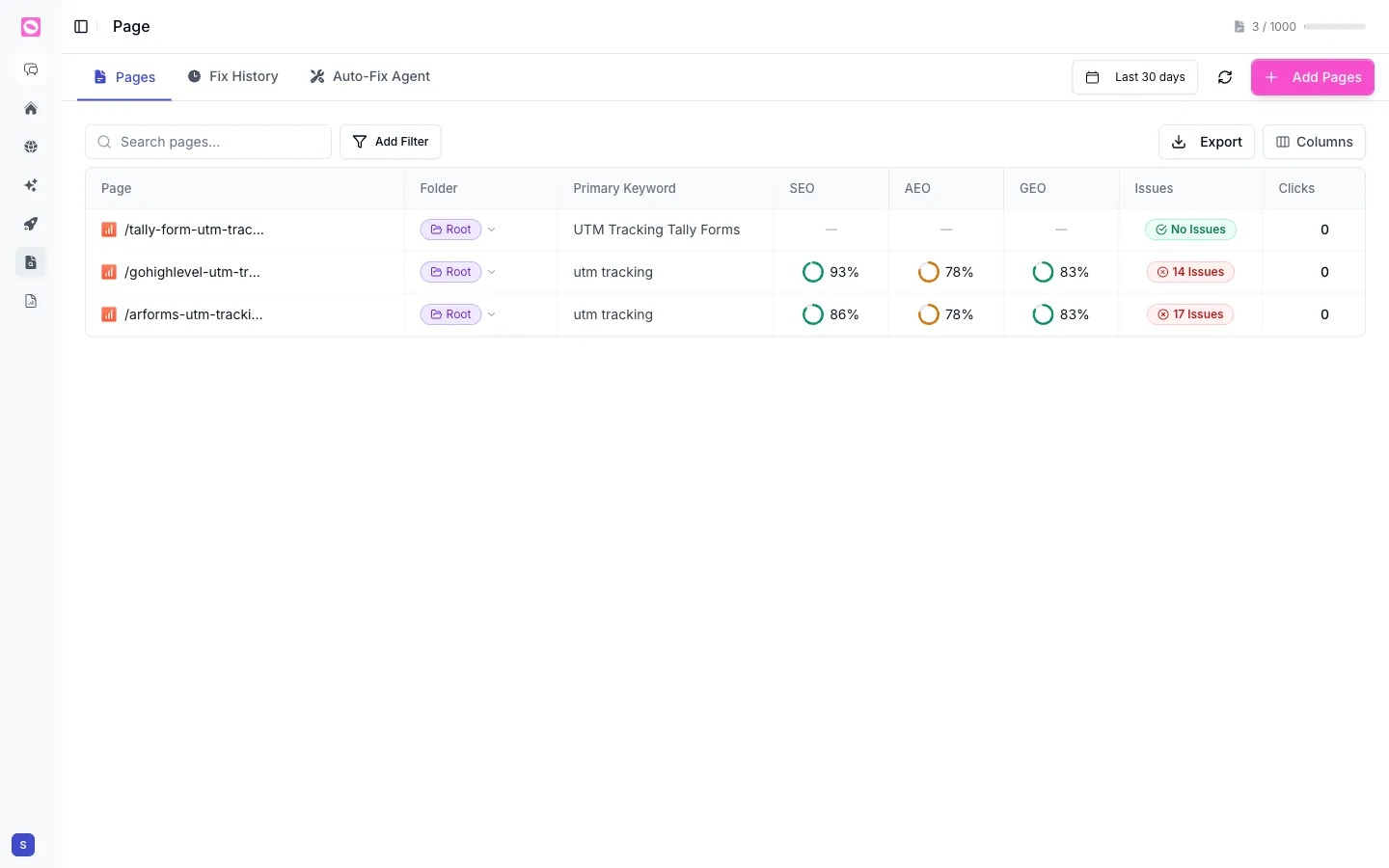
Add the pages you care about
Click Add Pages to start tracking URLs. You don’t need your whole site; track the pages that earn traffic or revenue: your homepage, key landing pages, top blog posts, and money pages. A counter at the top right shows how many pages you’re tracking against your plan’s limit.
Tracking 30 pages you actually care about beats tracking 3,000 you’ll never look at. Start with the pages that drive results, then expand.
Three scores for three kinds of search
Each page gets three scores, because a page is now judged by three different audiences:
- SEO is how well the page is optimized for traditional Google search.
- AEO (answer engine optimization) is how ready it is to be used in AI Overviews and answer engines.
- GEO (generative engine optimization) is how well it’s set up to be cited by generative AI like ChatGPT and Perplexity.
A page can ace one and fail another. A fast, well-linked page might score high on SEO but low on GEO if it has no author, no evidence, and never gets cited.
What the page audit checks
Each score is the result of a long list of individual checks. Open any page to see exactly which passed and which didn’t, grouped into the categories below.
SEO checks
| Category | What’s checked |
|---|---|
| Indexability & crawl | Returns HTTP 200, no redirect to reach the page, served over HTTPS, robots.txt allows Googlebot, no noindex (meta or X-Robots-Tag), canonical present and resolves, listed in your XML sitemap, indexed in Google |
| Meta & on-page | Title tag (30–65 chars), meta description (50–160 chars), exactly one H1, no skipped heading levels, mobile viewport, charset declared, html lang set, Open Graph tags, SEO-friendly URL |
| Content quality | Sufficient content depth, readability, images have alt text, no placeholder text |
| Performance (Core Web Vitals) | LCP, INP, CLS, real-user CrUX field data, TTFB, page weight, compression enabled, minimal render-blocking resources, mobile-friendly, Lighthouse performance |
| Links | Enough internal links, authoritative outbound citations, no broken links, links don’t point to redirects, no HTTPS→HTTP links |
| Structured data | Structured data present and valid |
AEO checks
These decide whether an answer engine can lift a clean answer straight off your page.
| Category | What’s checked |
|---|---|
| AI crawler access | AI crawlers are allowed, and content is in raw HTML (not rendered by JavaScript only) |
| Answer formatting | Answer-first (front-loaded), question-based headings, short scannable paragraphs, a summary or TL;DR |
| Extractable structure | Uses tables where useful, uses lists, scannable formatting |
| Answer schema | FAQ, HowTo, or QA schema present |
GEO checks
These decide whether a generative engine trusts your page enough to cite it.
| Category | What’s checked |
|---|---|
| Authority & E-E-A-T | Named author, expert quotes, claims are verifiable rather than hedged |
| Evidence | Original data or research, statistics cited to sources |
| Brand entity | Organization schema, sameAs entity links |
| Freshness | Visible publication date, last-updated date, content is current |
| Measured AI visibility | Whether the page actually appears in AI answers, and your AI share of voice |
| Third-party validation | Cited by authoritative sources |
Most checks read the page itself. The GEO score also folds in real outcomes: whether the page shows up in AI answers and how often it’s cited elsewhere. So GEO reflects not just how citable a page looks, but whether it’s actually being cited.
Find what needs work
Alongside the three scores, each page shows its Primary Keyword, its Folder, an Issues badge (No Issues, or a count like “14 Issues”), and Clicks.
Use the search box and Add Filter to focus, sort by the Issues column to surface the worst offenders first, and switch the date range to see recent changes. Export pulls the table into a spreadsheet, and Columns lets you choose what to show.
Open any page to see its full audit and work through the specific issues holding its score down.