How to Track Query Fan-Out in AI Search
AI engines expand one question into many hidden sub-queries. Query fan-out shows you those sub-queries so you can cover them in your content.
When you ask an AI engine a question, it rarely searches for just that one question. It quietly expands your prompt into a set of related sub-queries, searches for each, and stitches the results into a single answer.
That expansion is called query fan-out, and the Query Fanouts tab shows you the hidden questions your prompts trigger.
Why it matters
You might rank perfectly for “best ai visibility tracker” yet still be missing from the answer, because the engine also quietly searched for “ai visibility tracker for agencies,” “ai visibility tracker pricing,” and “ai visibility tracker vs rank tracker.”
If your content doesn’t cover those sub-questions, a competitor’s content fills the gap. Query fan-out turns one prompt into a map of everything the engine actually wanted to know.
Reading the Query Fanouts tab
Open AI Search Analytics, then the Query Fanouts tab. A toggle lets you view the data By Query (the sub-queries themselves) or By Prompt (grouped under the prompt that triggered them), and a counter shows how many unique queries you’ve surfaced.
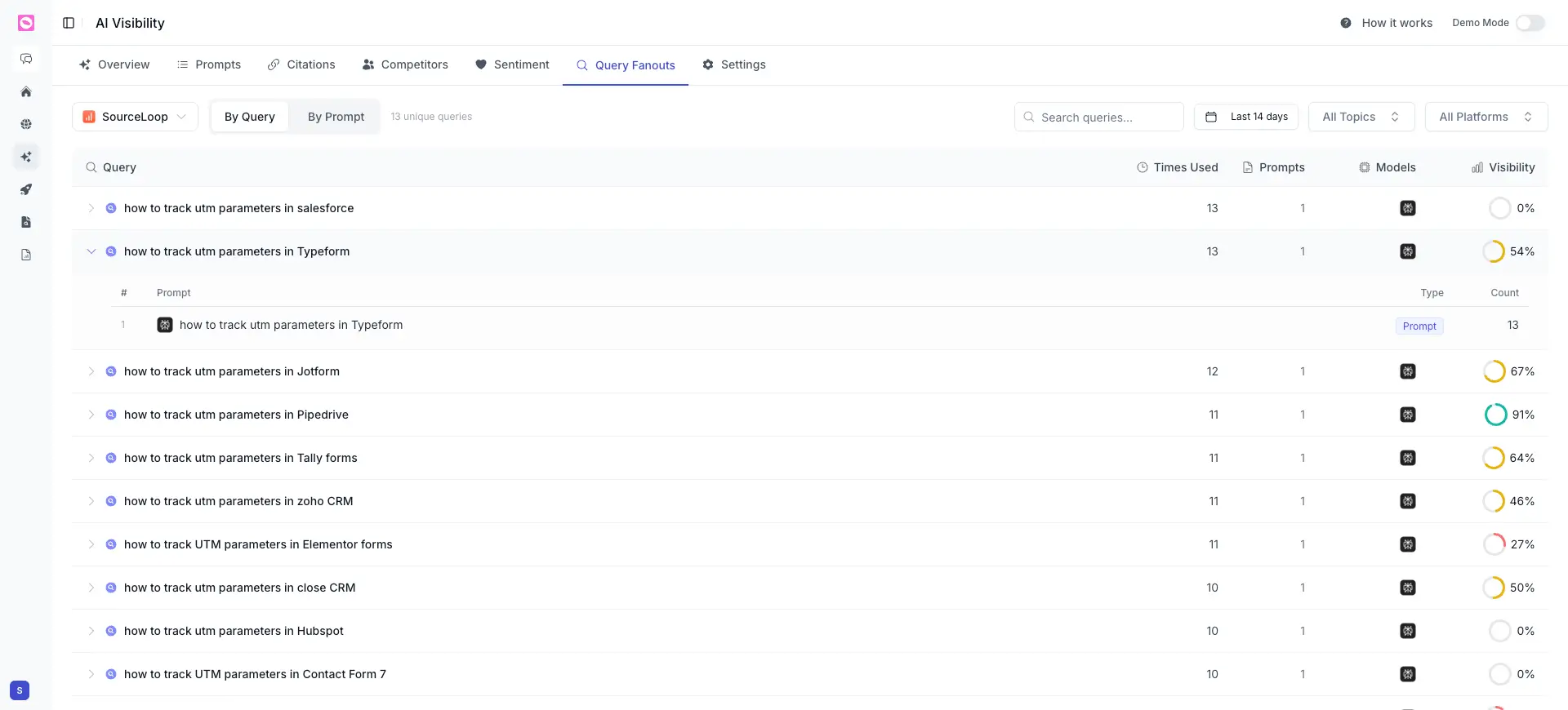
Each row is one sub-query, with:
| Column | What it tells you |
|---|---|
| Query | The sub-query the engine generated, like “how to track utm parameters in Typeform” |
| Times Used | How often this sub-query came up across your tracking |
| Prompts | How many of your tracked prompts triggered it |
| Models | Which AI models produced it |
| Visibility | Your visibility on that specific sub-query |
Expand any row to see the prompts behind it and how many times each one produced that sub-query.
Query fan-out is only exposed by some AI engines. Right now Orchly surfaces it mainly from ChatGPT and Perplexity, since those are the engines that reveal the expanded sub-queries behind an answer. Expect coverage to grow as more engines expose this.
How to use it
Sort by Times Used and look for sub-queries where your Visibility is 0%. Those are real, frequent questions the engines are asking on your behalf, and you’re not in the answer.
The strongest pages for AI search answer the whole cluster of sub-queries at once, with a clear section for each. Use the fan-out as your outline: one heading per sub-question the engine is already asking.
How it connects to the rest of Orchly
Query fan-out pairs naturally with the other AI Search Analytics tabs: