Orchly API keys and MCP: connect Claude and ChatGPT
Create scoped API keys for scripts and Zapier, and connect Orchly to Claude, ChatGPT or Cursor through the MCP server.
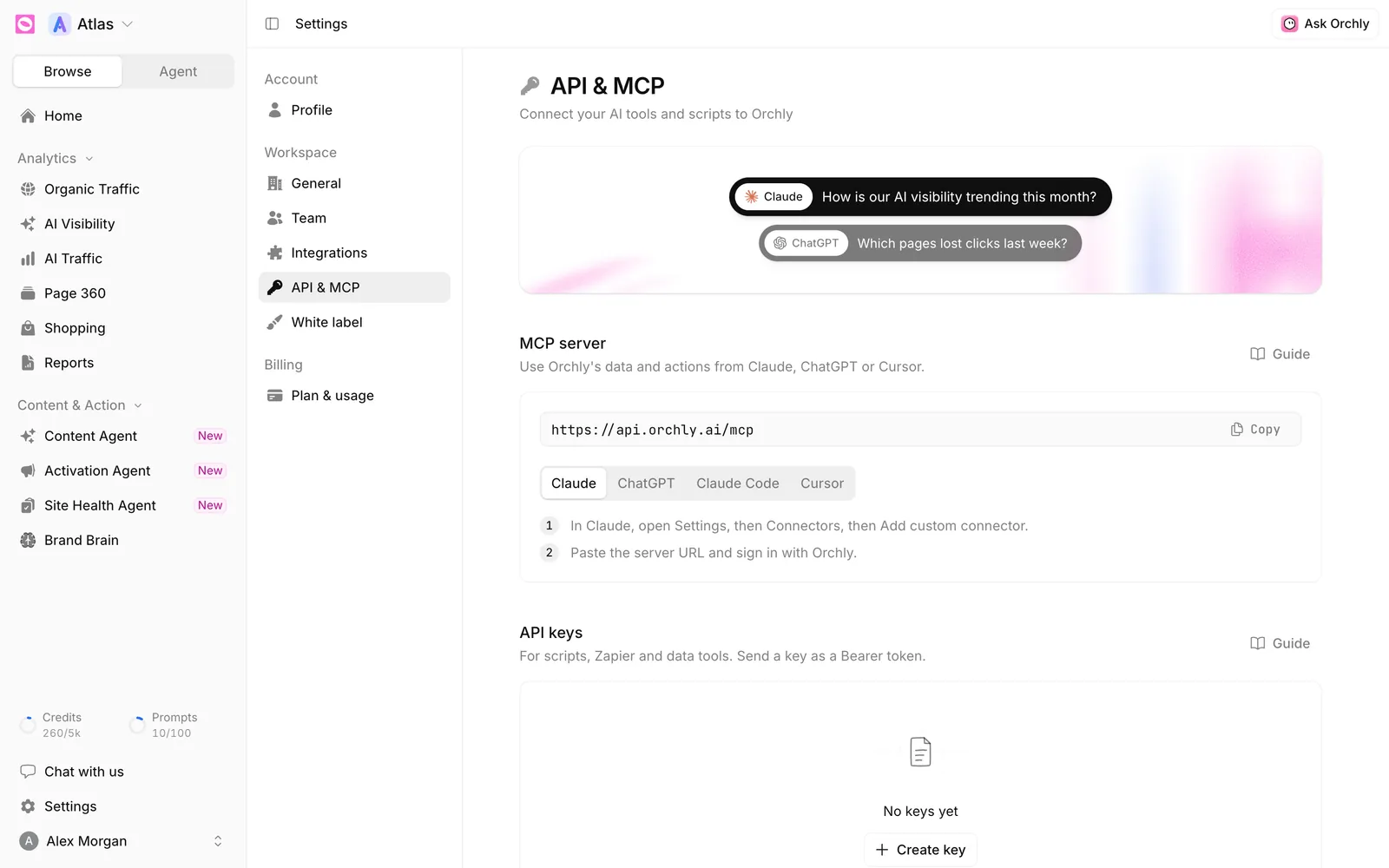
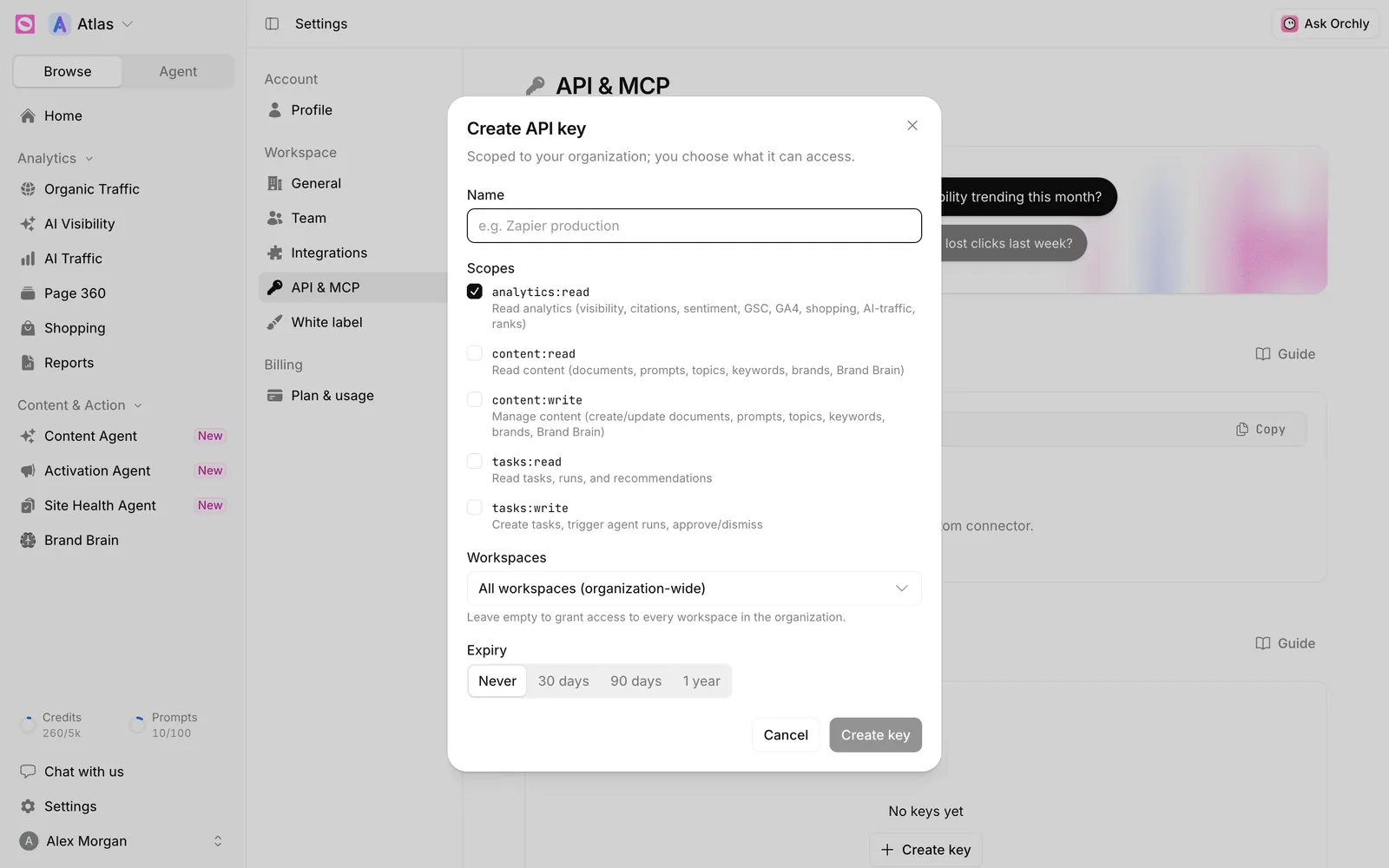
To connect Orchly to Claude, add Orchly’s MCP server as a custom connector in Claude and sign in with Orchly. For Claude Code, Cursor or your own scripts, you’ll also need an API key: open Settings, go to API & MCP and click Create key. Name the key, tick the scopes it needs, choose the workspaces and an expiry, then copy the key. It’s shown only once.
The same page connects Orchly to Claude, ChatGPT, Claude Code or Cursor through the Orchly MCP server, so you can ask about your AI visibility and search data from the AI tools you already use.
API key or MCP: which do I need?
| Use | Pick |
|---|---|
| Ask Claude or ChatGPT about your Orchly data in chat | MCP, signing in with Orchly. No key needed |
| Use Orchly from Claude Code or Cursor | MCP with an API key |
| Scripts, Zapier, spreadsheets or a data warehouse | API key with the REST API |
How do I create an API key?
- In Settings, open API & MCP.
- Under API keys, click Create key.
- Give it a Name you’ll recognize later, like “Zapier production”.
- Tick the Scopes it needs (see below).
- Under Workspaces, pick the workspaces it can reach, or leave it empty for every workspace in your organization.
- Choose an Expiry: Never, 30 days, 90 days or 1 year.
- Click Create key.
The next screen, Copy your API key, shows the full key. Copy it and store it somewhere safe, like a password manager. It’s shown only once. If you lose it, create a new key and revoke the old one.
Send the key as a Bearer token in the Authorization header of each request.
What do the scopes mean?
| Scope | What it allows |
|---|---|
analytics:read | Read analytics: AI visibility, citations, sentiment, Search Console, GA4, shopping, AI traffic |
content:read | Read documents, prompts, topics, keywords, brands and Brand Brain |
content:write | Create and update documents, prompts, topics, keywords, brands and Brand Brain |
tasks:read | Read tasks, agent runs and recommendations |
tasks:write | Create tasks, start agent runs, and approve or dismiss recommendations |
A reporting dashboard only needs analytics:read. Add write scopes only for tools that should change things in Orchly.
Anyone with a key can do whatever its scopes allow. Don’t paste keys into shared docs or commit them to code. Use separate keys for separate tools so you can revoke one without breaking the rest.
How do I manage and revoke keys?
The API keys table lists every key with its Name, the start of the Key, when it was Created, when it was Last used and when it Expires.
To revoke a key, click the bin icon on its row and confirm. Any integration using it stops working immediately, and it can’t be undone. The row stays in the list marked Revoked.
A key that hasn’t been used in months is a key nobody will miss. Revoke it.
What are the API rate limits?
Requests are limited per hour, per organization, across all your keys:
| Plan | Requests per hour |
|---|---|
| Free trial | 60 |
| Essential | 250 |
| Pro | 1,000 |
| Business | 5,000 |
The plan comparison on Plan & usage lists API access with Pro and Business, and MCP access on every plan.
How do I connect Orchly to Claude, ChatGPT, Claude Code or Cursor?
The MCP server section shows the server URL with a Copy button, and a tab for each client.
- Claude. In Claude, open Settings, then Connectors, then Add custom connector. Paste the server URL and sign in with Orchly.
- ChatGPT. In ChatGPT, open Settings, then Connectors, and add a custom connector. Paste the server URL, choose OAuth and sign in with Orchly.
- Claude Code. Copy the
claude mcp addcommand from the tab and replaceYOUR_KEYwith an API key. - Cursor. Copy the JSON from the tab into your Cursor MCP settings and replace
YOUR_KEYwith an API key.
Once connected, you can ask things like “How is our AI visibility trending this month?” or “Which pages lost clicks last week?” right inside Claude or ChatGPT.
Where are the full API and MCP docs?
- The Orchly API reference lists every endpoint, with parameters and examples in cURL, JavaScript and Python.
- The MCP docs cover setup for each client, the tools reference and use cases.
The Guide links on the API & MCP page open these too.