How credits work in Orchly
What uses credits, how many each model and audit costs, when they reset, and how to buy more when you run low.
Credits in Orchly pay for work you ask agents to do: chatting with Ask Orchly, writing and refreshing articles, generating images, web research and outreach. AI visibility tracking doesn’t use credits. Your plan adds a fresh batch of credits every month, shared across every workspace in your organization.
What uses credits?
Credits cover work that runs because you, or an agent you set up, asked for it.
| Uses credits | Examples |
|---|---|
| Agent chat and runs | Asking Ask Orchly a question, an agent writing an article, a scheduled agent, an agent column in a table |
| Document editor chat | Asking the AI in a document to rewrite a section |
| Images | Covers and illustrations an agent generates |
| Research | Web searches, page scrapes, search result snapshots, screenshots, keyword research, backlink data, content briefs |
| Site Health | Crawling and checking your site’s pages |
| Outreach | Writing outreach emails, reading replies, finding contact details, drafting Reddit replies |
What doesn’t use credits?
- AI visibility tracking. Running your tracked prompts on ChatGPT, Perplexity, Google AI Overviews and other AI engines, perception prompts and shopping visibility are covered by your tracked-prompt limit, not credits.
- Setup and upkeep. Onboarding, Brand Brain reading your website and files, and the daily sitemap crawl.
- Background discovery. Finding Reddit threads and the opportunities Orchly AI lists on Home.
- Failed work. If a search, scrape or image fails, you’re not charged. A contact lookup that finds no one is free too.
How many credits does each thing cost?
AI model calls are priced from what the call actually cost, so a short question costs less than a long article. The model you choose matters most. The model picker shows each model’s typical cost per turn:
| Band on the model card | Examples |
|---|---|
| Up to 10 credits a turn | DeepSeek V4 Flash, GPT-5.6 Luna, GPT-5 mini, Gemini 3.1 Flash Lite |
| 11 to 35 credits a turn | Gemini 3.5 Flash, Claude Haiku 4.5, DeepSeek V4 Pro |
| 36 to 50 credits a turn | Claude Sonnet 5 (the default), GPT-5.6 Terra |
| Over 50 credits a turn | Claude Sonnet 4.6, GPT-5.6 Sol |
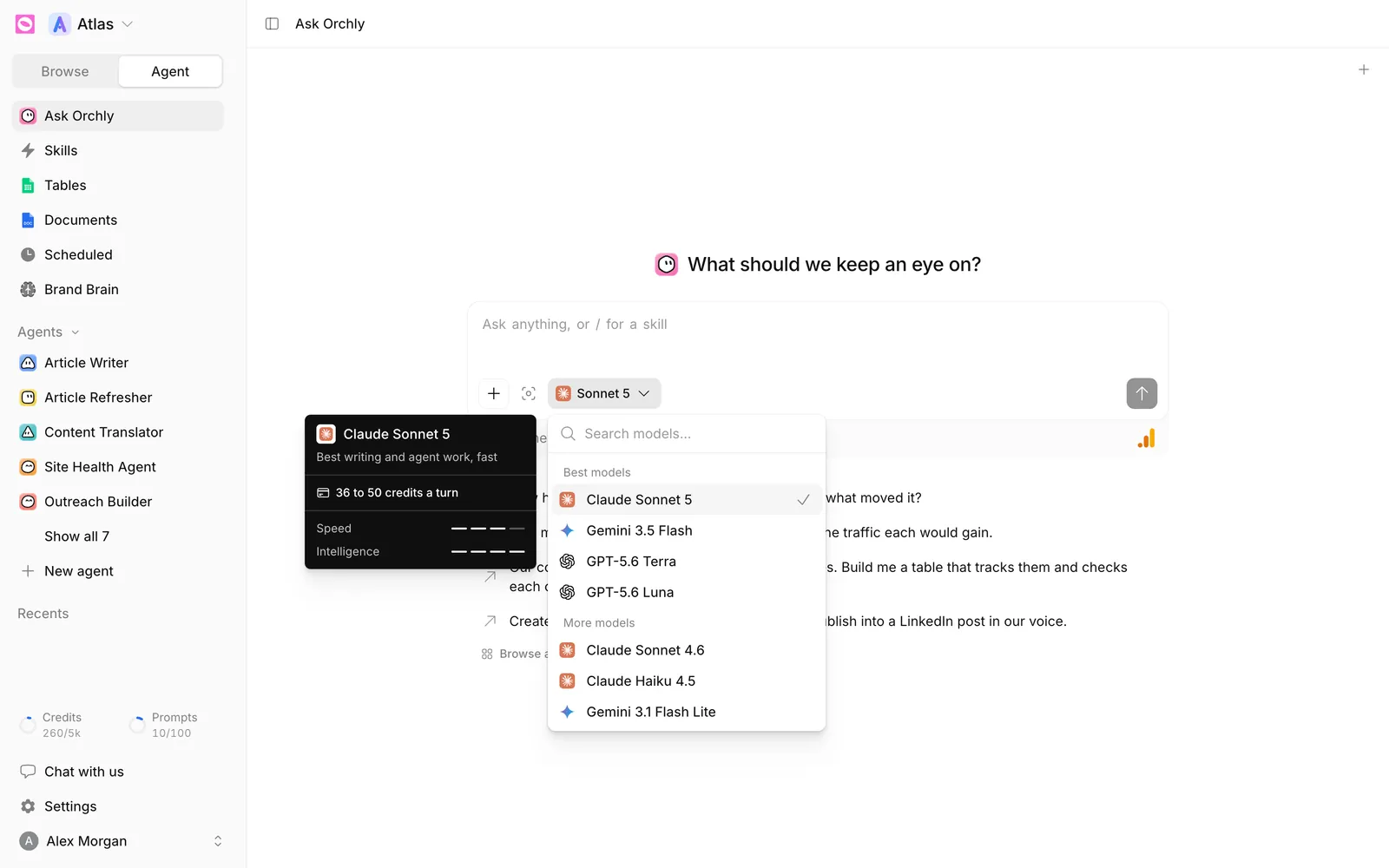
Tools an agent calls have fixed prices:
| Action | Credits |
|---|---|
| Web search | 4 |
| Page scrape | 2.5 |
| Search result snapshot | 3 |
| Screenshot | 2.5 |
| Contact lookup that finds someone | 12.5 |
Credits are counted to two decimal places, so small actions aren’t rounded up. A full article with research and a few images takes more than a chat turn, because it’s many turns plus tools. When a job doesn’t need the best model, pick a cheaper one in the model picker next to + in chat, or in an agent’s Model row.
How many credits do I get?
| Plan | Credits per month |
|---|---|
| Free trial | 1,000 |
| Essential | 1,500 |
| Pro | 5,000 |
| Business | 25,000 |
Credits belong to your organization, not a single workspace. Any workspace can use them, and the table on Plan & usage shows how many each website used.
When do credits reset?
Plan credits refill once a month, on the same day your subscription started. That’s true on yearly plans too: you get the monthly amount every month, not a year’s worth up front.
Unused plan credits don’t carry over. The next month starts fresh at your plan’s amount. If you upgrade partway through a month, you get the difference straight away.
The Credits tile on Plan & usage shows the reset date, like “Plan credits reset 4 Oct”.
Where can I see my balance?
- The Credits counter at the bottom of the sidebar, like 260/5k, on every page
- The Credits tile on Settings, Plan & usage
- The website table on the same page, for credits used per workspace
What happens if I run out of credits?
Work that needs credits stops until you top up or your plan renews:
- In chat, you’ll see an Out of credits message: “You are out of credits. Top up or wait for your plan to renew to keep chatting.”
- Scheduled and table agent runs don’t start, and the run says the organization is out of credits.
- Outreach drafts and contact lookups are refused with the same message.
Tracking keeps running. Your AI visibility, AI traffic and organic data still update because they don’t use credits.
How do I buy more credits?
Open Settings, then Plan & usage, and click Buy more credits on the Credits tile. Pick a pack and continue to payment.
- A credit pack is a one-time payment, not a subscription.
- Bought credits last 12 months.
- They’re used after your plan credits, so they only start going down once the monthly allowance is spent.
If you run out every month, a bigger plan usually works out better than buying packs. If it’s a one-off, like a big content push, a pack is simpler. Compare plans on Plan & usage.