Why ChatGPT doesn't recommend your brand
Objections lists the reasons AI engines give for not picking your brand, sorted into misinformation, content gaps and real limitations.
To find out why ChatGPT doesn’t recommend your brand, open AI Visibility, click Perception, and switch to Objections. It lists every reason ChatGPT, Gemini, Perplexity and Google’s AI answers give against your brand, scores how loudly each one comes up, and checks it against your own facts.
That last part matters. An objection that’s false needs a correction. One that’s true needs a product conversation, not a blog post.
Where do the objections come from?
Once a week Orchly asks each AI engine a small set of perception prompts about you and your competitors. Some are direct (“Why might a growing sales team not choose Atlas?”), others are evaluations and head-to-head comparisons. Every negative reason in those answers is pulled out and grouped by meaning, so “limited integrations” and “smaller integration marketplace” end up as one objection.
If you haven’t set perception up yet, the view shows See how AI sees your brand with a Set up perception button. The first answers land within the hour.
Why ChatGPT and other AI engines say no to your brand
The main card, Why AI says no to your brand, ranks objections by score. The score blends how often and how early AI raises each one: 100 means it’s the first objection in every answer, and it drops 10 points for each later position.
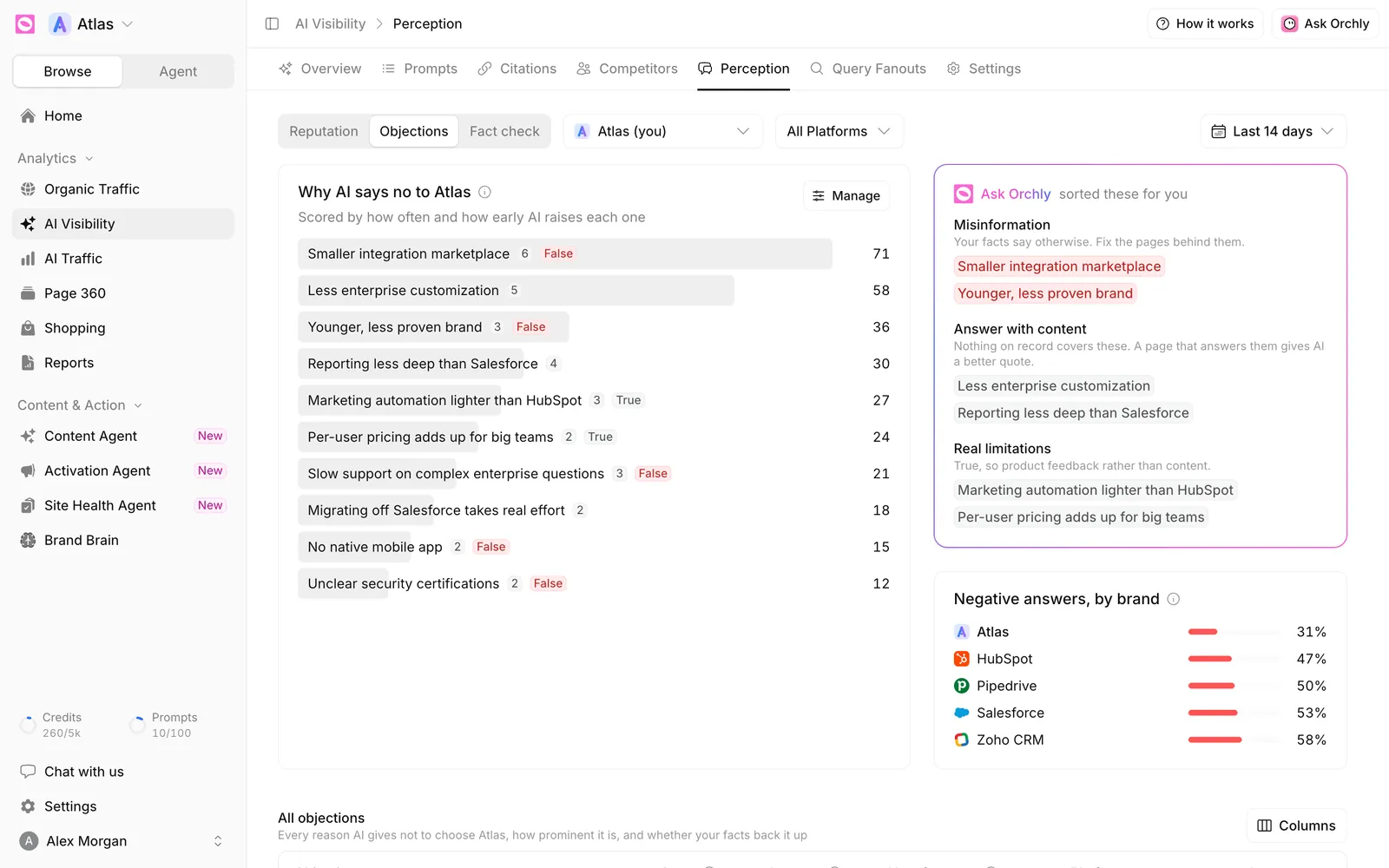
Small tags help you scan it:
- A number shows how many different phrasings are grouped into that objection.
- False means a fact in Brand Brain contradicts it.
- True means a fact supports it.
The three buckets: misinformation, content gaps, real limitations
Next to the ranking, Ask Orchly sorts the top objections into three groups, because each one calls for a different fix.
| Bucket | What it means | What to do |
|---|---|---|
| Misinformation | Your facts say otherwise | Fix the pages AI is reading. See fact-check AI answers |
| Answer with content | Nothing on record covers it | Publish a page that answers the objection directly |
| Real limitations | It’s true | Share it with product as buyer feedback |
The Answer with content bucket is usually where the quickest wins are. AI fills gaps with third-party opinions or guesses, so a clear page from you gives it a better quote.
Negative answers, by brand
Negative answers, by brand shows the share of perception answers about each brand that say something negative. It keeps things in proportion. If you’re at 31% and every competitor is near 50%, AI is tougher on the whole category than on you.
The All objections table
All objections lists everything, sorted by score. The columns are:
- Objection, with its phrasing count.
- Score: how often and how early AI raises it.
- Answers: the share of answers about you that raise it.
- Your facts say: It is false, It is true or Not covered.
- Platforms and Last seen.
Use the brand picker at the top to run the same view for a competitor. Their objections are often your best sales talking points.
Open an objection to see the evidence
Click any objection to open its drawer. You’ll see How AI phrases it, then What AI said: real quotes with the platform, the prompt type and the question asked. Full answer opens the whole response with the passage highlighted.
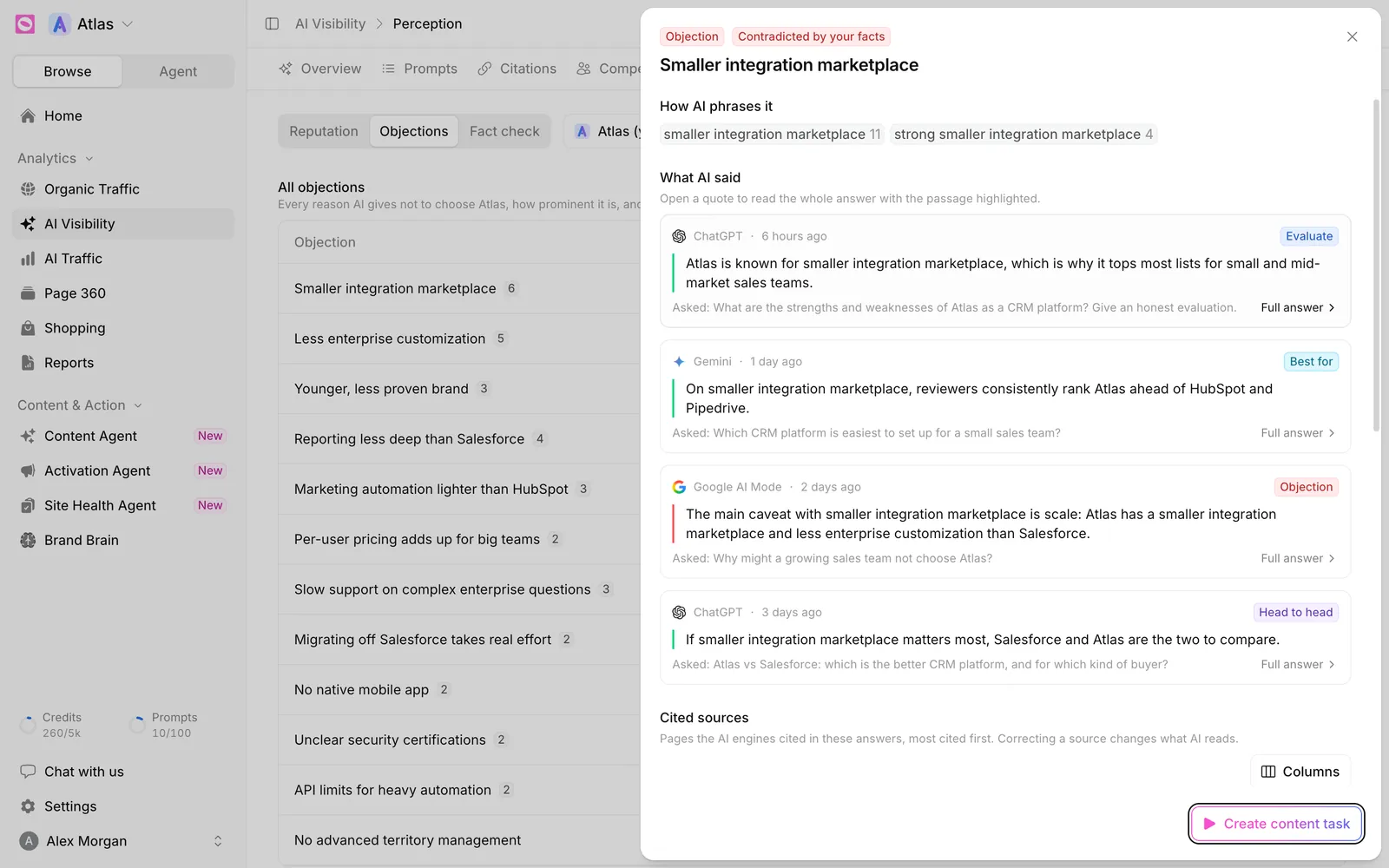
Below that, Cited sources lists the pages AI cited in those answers, most cited first, tagged Yours, Competitor or Third-party. Ask Orchly then recommends a plan with Why it matters and What to do, tailored to the bucket the objection falls in.
When you’re ready, click Create content task. It lands on your Content Agent board with the quotes and sources attached, ready for an agent to draft the page.
If an objection keeps citing the same review site or listicle, your own page won’t be enough. Pitch a correction to that site, or use the Activation Agent to find outreach opportunities there.
Clean up how objections are grouped
Click Manage on the main card to open Manage objections. You can rename, merge, hide or delete an objection, or move phrasings from one to another. Changes apply to every past answer at once, so your history stays consistent.