How to fix wrong information ChatGPT says about you
Check AI answers against the facts in Brand Brain. See every wrong claim, which platform made it, and the source it came from.
To find and fix wrong information ChatGPT says about your company, open AI Visibility, click Perception, and switch to Fact check. Orchly pulls every checkable claim out of ChatGPT, Gemini, Perplexity and Google AI answers about you, compares each one with the facts you keep in Brand Brain, and flags the ones that are wrong.
Wrong pricing, a missing integration, an old claim that you don’t have SOC 2. These are AI hallucinations about your brand, and each one can rule you out before a buyer ever visits your site.
Before you start: add facts to Brand Brain
Fact check only works against facts you’ve given it. It uses facts from the Company and Products sections of Brand Brain, such as pricing, integrations, certifications, plans and support hours.
Each fact has a switch labelled Use to fact-check AI answers. It’s on by default for company and product facts. Turn it off for anything that’s an opinion or changes too often to check.
If you have no facts switched on, Fact check shows Add facts to check against with an Open Brand Brain button. Brand Brain can draft facts from your website, so you’re not starting from a blank page.
“Atlas is SOC 2 Type II certified and supports SSO” is easy to check. “We take security seriously” isn’t. Specific, plain statements give you clearer verdicts.
Your facts also shape the weekly perception prompts. Orchly writes Fact questions from them, so each fact gets asked about.
How accurate is AI about your brand?
The top of Fact check has four numbers and a weekly chart.
| Metric | What it means |
|---|---|
| Accuracy | Supported claims / (Supported + Contradicted). Of the claims your facts cover, the share AI got right |
| Contradicted | Distinct wrong claims: statements a Brand Brain fact contradicts |
| Claims checked | Checkable claims AI made about you, and in how many answers |
| Facts never mentioned | Facts AI never confirmed or contradicted in the period, like “3 of 9” |
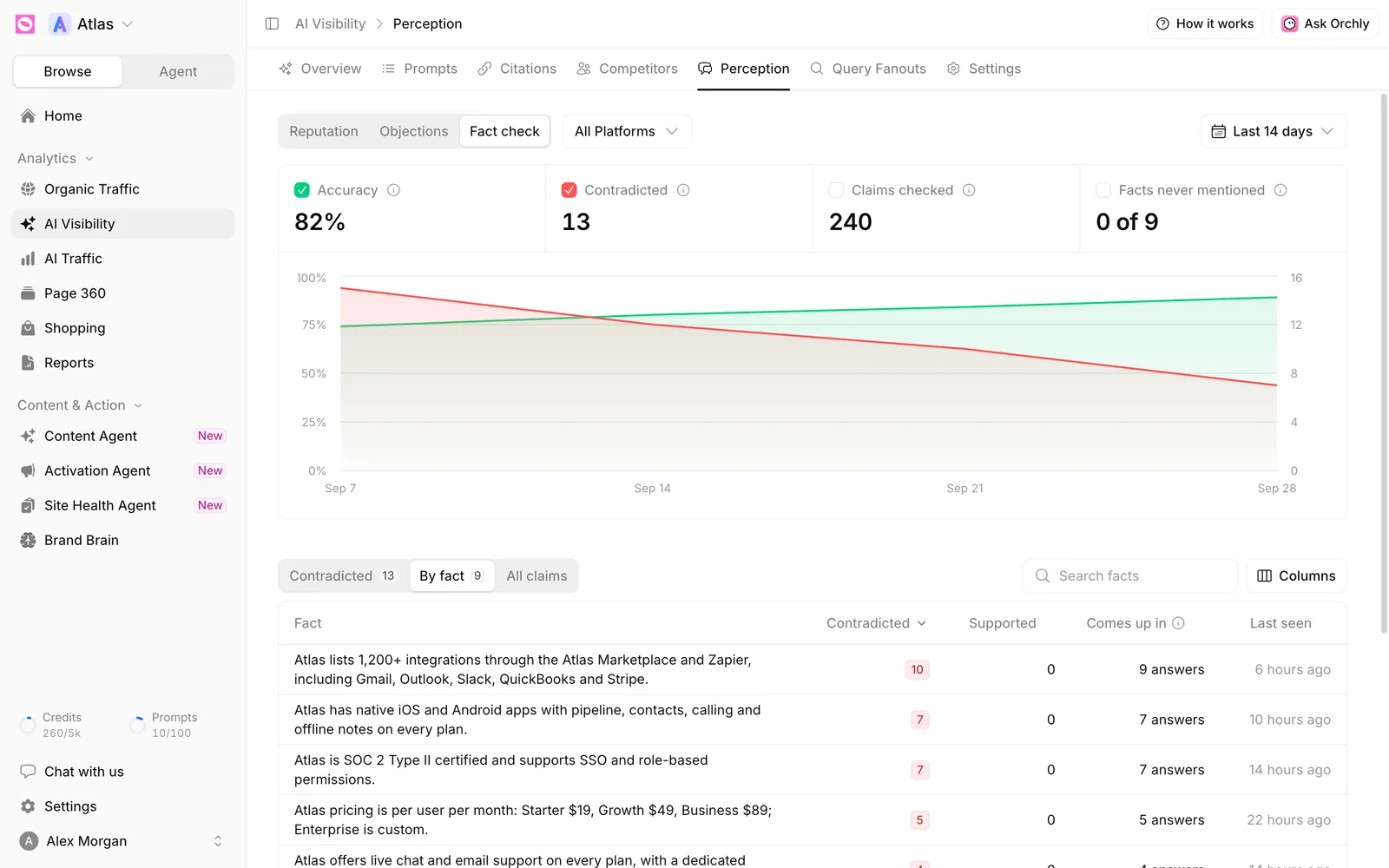
Facts never mentioned is easy to overlook. Those are selling points AI doesn’t bring up at all, which is a content gap rather than an accuracy problem.
Three ways to read the claims
A switch above the table changes what you see.
- Contradicted (the default) lists only wrong claims. Start here.
- By fact lists each of your facts with its Contradicted and Supported counts and Comes up in, the number of answers that touched it. A fact AI never raises shows Never.
- All claims lists every claim, with its verdict.
The claim tables show What AI claims, Your fact, Verdict, Platforms, Answers and Last seen. Verdicts are:
- Contradicted: your fact says otherwise.
- Supported: AI has it right.
- Marked correct: you reviewed it and said it’s fine.
- No fact covers it: nothing in Brand Brain to check it against.
Use the search box to find claims or facts by keyword, and the platform filter to see if one engine is the problem.
How to fix wrong information in AI answers
Click a claim to open its drawer. At the top you’ll see Your fact next to what AI claims, with an Edit facts in Brand Brain link in case your fact is the thing that’s out of date.
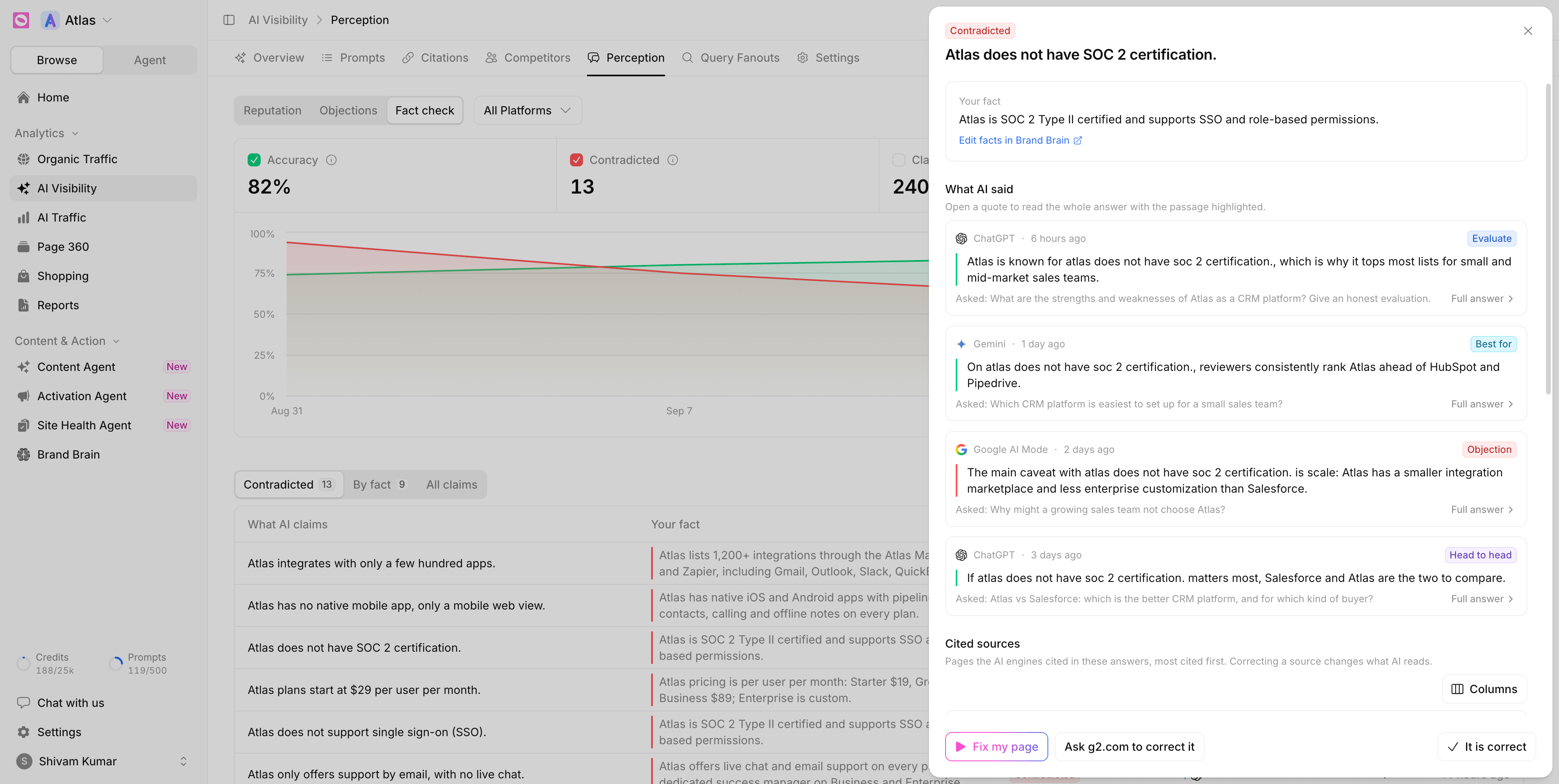
Below that are the AI quotes (What AI said), the Cited sources behind them, and a recommendation from Ask Orchly with Why it matters and What to do.
The footer has the actions:
- Fix my page appears when one of your own pages is cited. It creates a task for an agent to correct that page.
- A button named after the cited site, like Ask g2.com to correct it, appears when a third-party page is cited. It creates an outreach task with your fact and the page to fix.
- It is correct marks the claim as fine if the check got it wrong.
- It is wrong marks a claim as contradicted when the check missed it.
Your override applies to that wording now and in future answers.
Claims are rechecked every week. A claim drops out of Contradicted once AI stops repeating it, so you can watch Accuracy climb after you fix the source.
Where to go next
Wrong claims often show up as objections too. Check why AI tells buyers no to see which false objections are costing you, and how AI describes your brand for the overall tone. To keep your facts current, see how to add company and product facts.